
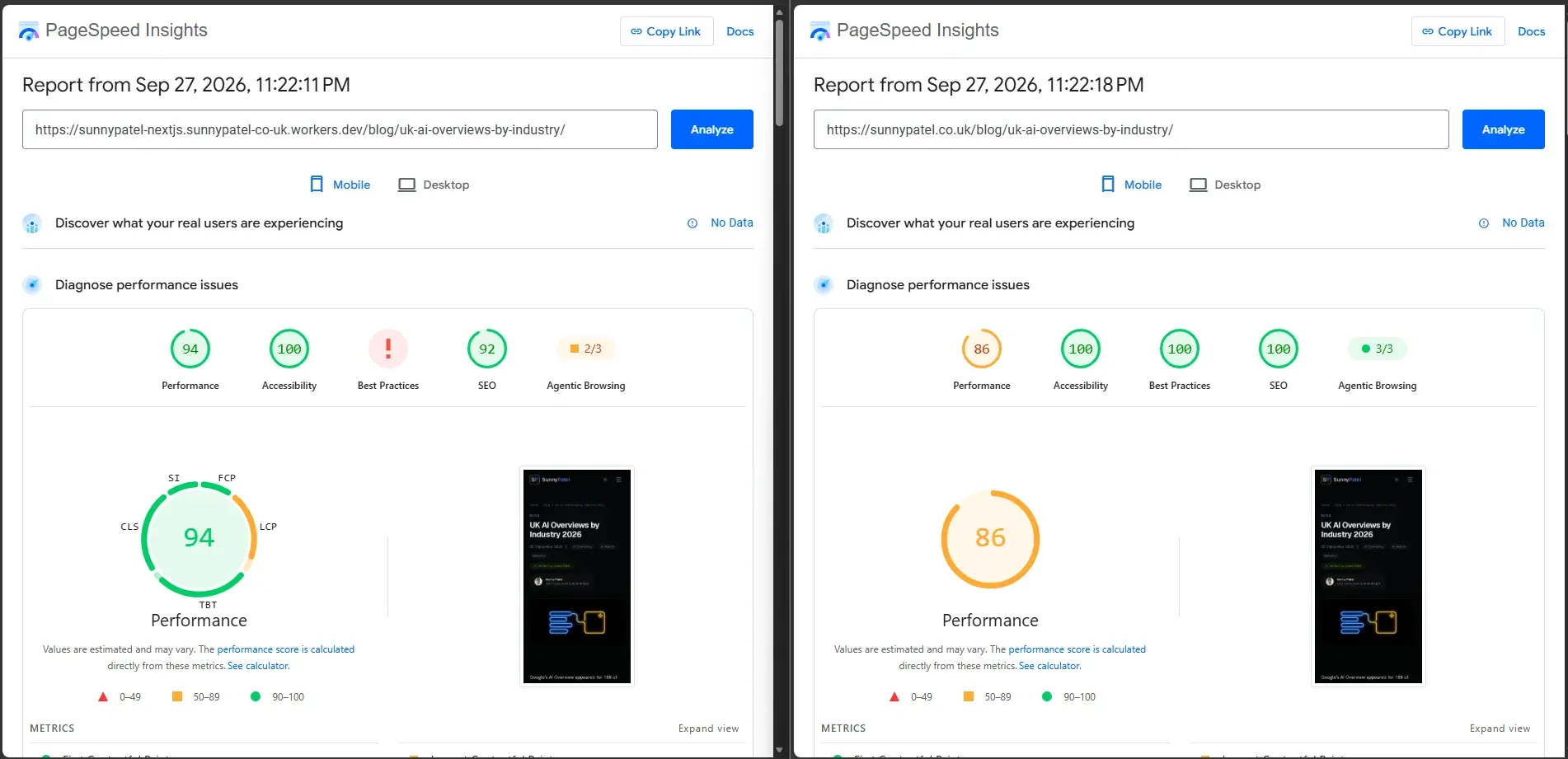
I deployed a Cloudflare Workers version of this Next.js site because its Vercel Hobby usage was approaching several limits. The live domain still routes to Vercel through Cloudflare. The migration exposed an adapter bug that made the first speed comparison misleading, so I fixed it before running the comparison below.
Why I tested the move
My Vercel dashboard showed 845,048 ISR reads out of a 1,000,000-read Hobby allowance over the preceding 30 days. This project accounted for 725,782 of those reads, or 85.9%. Fast Origin Transfer was at 6.62 GB out of 10 GB, edge requests were at 348,000 out of 1,000,000, and deployment storage was at 2.6 GB out of 10 GB. A Hobby limit can pause a project. Vercel Pro costs $20 per month.
I deployed the migration branch with OpenNext's Cloudflare adapter. Prerendered pages are served as Workers static assets, so requests to that deployment do not use Vercel's ISR allowance. The Worker currently runs on Cloudflare's free plan. The apex domain passes through Cloudflare before Vercel, so I excluded it from the fresh speed test.
How I measured Vercel and Cloudflare Workers
I compared the direct Vercel production host, sunnypatel-nextjs.vercel.app, with the migration branch on sunnypatel-nextjs.sunnypatel-co-uk.workers.dev. Both are platform subdomains. I checked for server: Vercel on the Vercel host before each batch.
The Vercel host served the current master build. The Worker served the migration branch, including the redirect move from proxy.ts, removal of optimizeCss, and the prefetch fix described below. This is a comparison of the two live deployments, not a controlled test of hosting alone.
On 28 September 2026, I ran Lighthouse 12 in headless Chrome from one UK connection. I used its default mobile throttling and desktop preset, with five runs per host, device and page, alternating hosts after each run. The four paths were the homepage, an AI Overviews blog post, the services page and the SSL checker. I also interleaved 30 curl requests per host and path to measure time to first byte. The PageSpeed Insights API returned HTTP 429 on all three attempts for each host, so I used the local Lighthouse reports. These are lab measurements. I have no CrUX field data for these platform subdomains, and a different connection or cache state can change the result.
Lighthouse results after the prefetch fix
Mobile Lighthouse medians
| Page | Performance V/W | LCP seconds V/W | Transfer KB V/W |
|---|---|---|---|
| Home | 87 / 82 | 2.87 / 4.13 | 706 / 730 |
| AI Overviews post | 93 / 84 | 2.98 / 4.04 | 708 / 739 |
| Services | 96 / 95 | 2.40 / 2.47 | 641 / 663 |
| SSL checker | 98 / 96 | 2.28 / 2.43 | 568 / 580 |
Desktop Lighthouse medians
| Page | Performance V/W | LCP seconds V/W | Transfer KB V/W |
|---|---|---|---|
| Home | 100 / 99 | 0.58 / 0.84 | 712 / 739 |
| AI Overviews post | 100 / 99 | 0.57 / 0.86 | 710 / 741 |
| Services | 100 / 99 | 0.54 / 0.88 | 722 / 762 |
| SSL checker | 100 / 100 | 0.46 / 0.65 | 622 / 645 |
V/W means Vercel / Workers. Vercel led the mobile performance median on all four pages. On desktop, Vercel scored 100 on every page; Workers scored 99 on three and 100 on the SSL checker. Accessibility medians were 100 except on services, where both scored 96. Best Practices and SEO medians were 100 throughout. One Workers desktop blog run scored SEO 92, explained below.
Each figure is the median of five runs. The raw reports and test summary retain FCP, TBT, CLS, Speed Index, server response time, full score ranges and total transfer. A lab score is a snapshot of this deployment and connection.
Time to first byte and response delivery
| Page | TTFB median ms V/W | p90 ms V/W | HTML bytes V/W |
|---|---|---|---|
| Home | 118 / 163 | 168 / 331 | 314670 / 312905 |
| AI Overviews post | 99 / 121 | 170 / 154 | 257227 / 256002 |
| Services | 115 / 127 | 154 / 173 | 449137 / 448402 |
| SSL checker | 115 / 115 | 170 / 186 | 111032 / 110347 |
V/W means Vercel / Workers. TTFB is curl's time_starttransfer, including DNS, connection setup and server work. The requests were interleaved between hosts. Vercel had the lower median on three pages; the SSL checker was effectively tied. The HTML byte figures are curl's downloaded document bytes, while the Lighthouse transfer figures above include page assets.
This Windows curl supports HTTP/1.1, so I used the Lighthouse browser records to check protocol. All 40 Vercel document loads used h2. The Worker used h3 on 31 and h2 on nine, and advertised h3 through alt-svc. Vercel returned x-vercel-cache: HIT on every curl request, with an age header. The Worker returned s-maxage=31536000 and stale-while-revalidate=2592000, without cf-cache-status or age in these responses. The headers describe the platform subdomains, not the proxied apex.
The prefetch bug behind the first comparison
My first Workers homepage Lighthouse runs were affected by thousands of repeated _rsc requests. One uncapped run logged 6,475 requests and 52.5 MB of transfer; another logged 7,435 requests and 60.5 MB. A five-run mobile homepage batch taken before the fix had a Workers performance median of 86 against 93 on the then-direct Vercel apex. Those numbers belong to the faulty deployment and should not be read as a clean platform comparison.
The cause was specific to this Next.js and OpenNext combination. Next.js 16.3 enabled experimental.prefetchInlining by default. OpenNext's cache interceptor saw that setting and sent full-page React Server Component data when the browser asked for a small route-tree segment. The browser could not use that response and kept requesting it. A /blog/ segment request returned 246,766 bytes on the faulty Worker, against 642 bytes on Vercel.
I set experimental: { prefetchInlining: false } in next.config.ts. The fixed Worker returns a 602-byte segment with x-nextjs-postponed: 2. In a 15-second headless browser check, _rsc requests fell from 2,480 to 21 on the Workers homepage and from 2,840 to 30 on /blog/. The direct Vercel host made 11 requests on each page. The fixed Worker counts are in the same range, with no runaway loop.
The request storm also explains one oddity in my original PageSpeed Insights screenshot. Workers Best Practices showed an error. A reproduced Lighthouse audit failed its charset check because Chrome DevTools had evicted the main document body from its inspector cache during the storm. That was a test failure on the faulty deployment, not evidence of an inherent Cloudflare penalty.
The screenshot's Workers SEO score was 92. One fresh Workers desktop blog run also scored 92: its robots-txt audit failed because Lighthouse could not download the file. The other four Workers desktop runs scored 100, and the robots file responded when I checked it directly. A transient audit fetch could explain the screenshot, but I do not have its original PSI JSON to confirm that it failed the same audit. The workers.dev canonical audit passed in the fresh run.
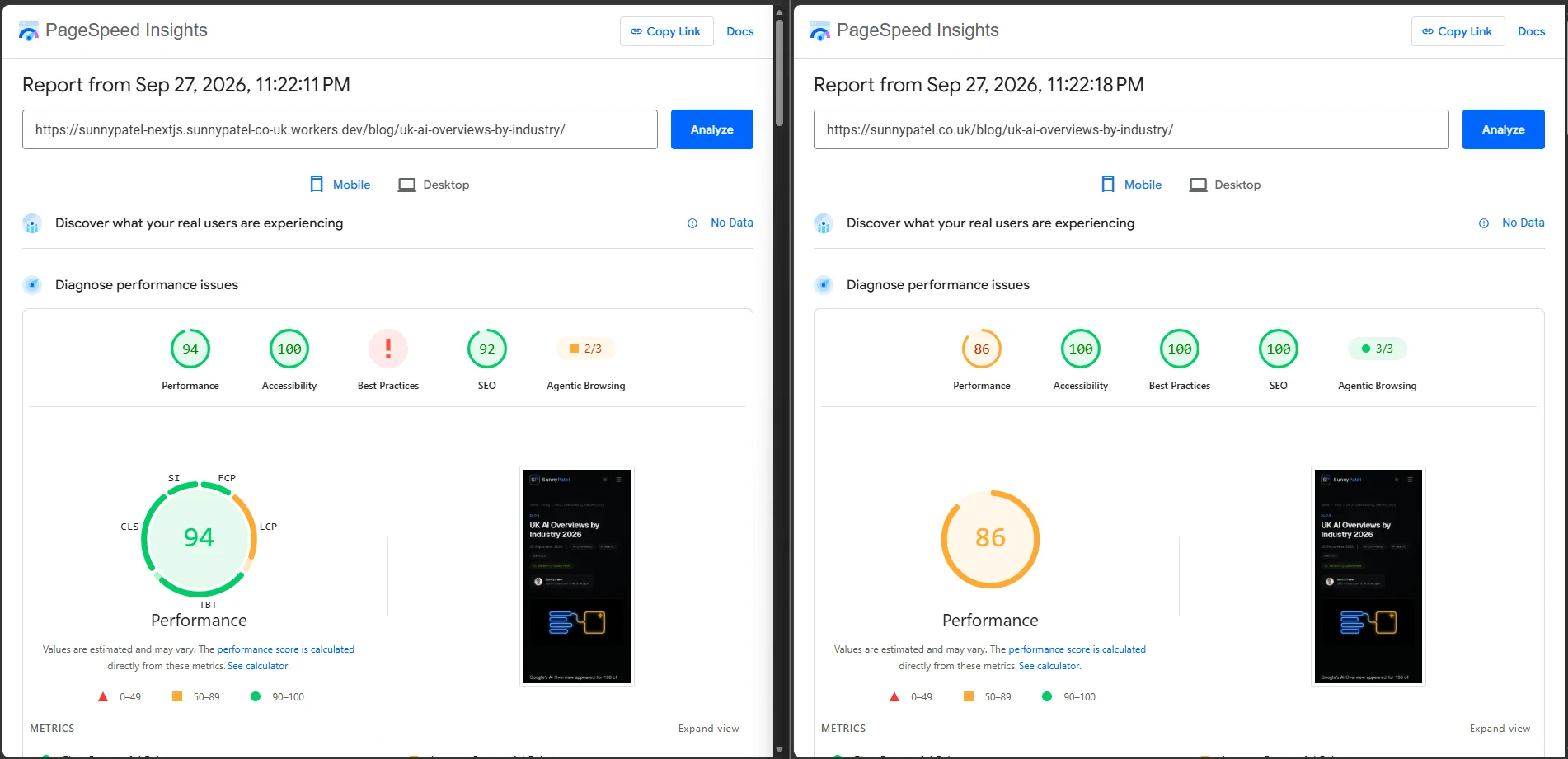
That screenshot is a single pre-fix run from 27 September. The apex later moved behind Cloudflare and is not the Vercel host in my fresh measurements.
What broke during the migration
The adapter converted the Next.js build into a Worker, but several features needed changes in this project:
- Next.js 16's
proxy.tsredirects did not work in this deployment. I moved two redirects intoworker.ts. experimental.optimizeCssbroke the OpenNext build. I removed it; this App Router site's CSS delivery did not change.- A
next.configrewrite for the static CV PDF returned a 404 on Workers. I moved the route intoworker.ts. - The SSL checker used
node:tlsfor the peer certificate. Workers could not provide that raw TLS access. It now uses a live HTTPS handshake and the Cert Spotter certificate transparency API. I removed the serial-number and signature-algorithm display. - The Worker bundle initially compressed to 3.33 MB, above the 3 MB deployment threshold encountered during the move. The runtime OG renderer was unnecessary because the OG images were prerendered. Stubbing that renderer brought the bundle to 2.73 MB. A build guard stops any OG route that would need runtime rendering. Cloudflare's current limits page no longer lists a compressed-size cap, so this records the threshold I encountered during the move.
On workers.dev, 200 of 200 sitemap URLs returned 200, all 188 checked OG images loaded, and the redirects matched. DNS nameservers moved to Cloudflare while Hostinger Mail kept its MX, SPF and DKIM records. The apex still reaches Vercel. Those checks cannot cover every future Next.js feature.
Cost and who should move
The Worker deployment currently costs me £0 on Cloudflare's free plan. The comparison with Vercel Pro is $20 per month before any other usage charges. My reason to test the move was the site's approach to Hobby limits, especially ISR reads. Live traffic still reaches Vercel, so this is not a realised hosting saving.
The free-plan outcome depends on this site's request volume, bundle and feature use; it is not a universal price quote. Vercel's pricing can change, so check the current terms for your own deployment.
A mostly prerendered Next.js site like this one can benefit if Vercel's usage limits are the constraint and you can test the Worker build properly. Keep a Vercel deployment if you rely on its managed Next.js behaviour and do not want to adapt middleware, rewrites, Node APIs or runtime image generation. For a Worker move, check those features against your own routes before moving traffic.
My verdict
Vercel led all four mobile Lighthouse performance medians and had lower curl TTFB on three pages. The Worker build offers a route away from Vercel's ISR allowance, and its prefetch request storm is fixed. The builds and hostnames differ, so these measurements cannot isolate a pure hosting effect. I would switch this site's traffic only after testing the prefetch setting and route changes against the live domain.